


Hardwood Spades - Card Game
4.52.66K Reviews
App Specs
- Version
- 2.0.635.0
- Updated On
- License
- Free
- Downloads
- 500,000+
- Developer
- Silver Creek Entertainment
- Categories
- Card
- Platform
- Android
Screenshots



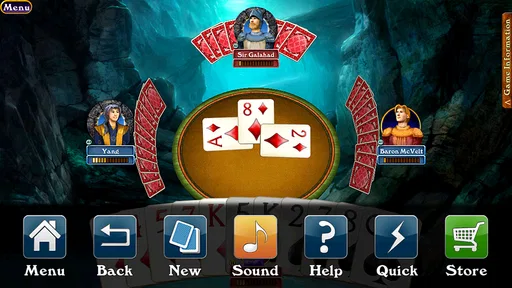
 Analysis by AppCompare
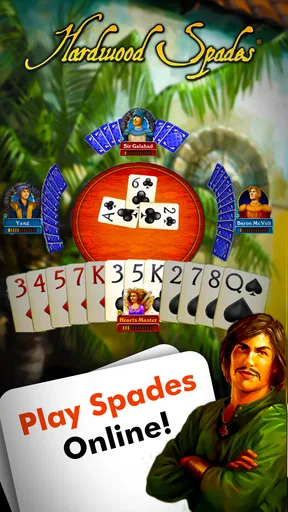
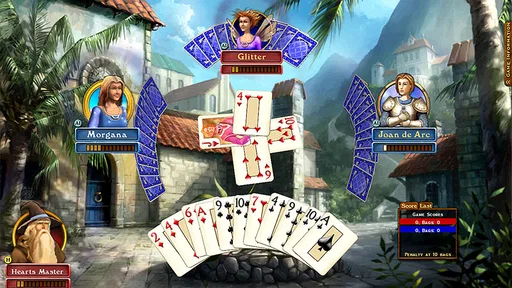
I spent time with Hardwood Spades as a straightforward way to play the classic partnership card game on a phone. It comes from Silver Creek Entertainment and stays focused on the table rather than dressing the experience up with casino-style distractions. That narrow purpose is its biggest appeal: if what I want is a familiar Spades match, with the decisions and tension coming from the cards, this is much easier to understand than a game built around layers of unrelated rewards.
It is a free card game for Android, rated Teen, with optional in-app purchases ranging from $0.99 to $99.99 per item. The game has been available since December 19, 2011, and its current version is 2.0.635.0. Those details matter less than the way the game feels in ordinary use, but they do tell me that this is an established title rather than a brand-new experiment. Its average rating is 4.5 from around 9.1K ratings, and it has passed 500K installs, which gives it a reasonably substantial player footprint.
How the game feels during a normal match
The first thing I noticed is how quickly Hardwood Spades gets to the point. There is no need to learn a complicated progression system before I can think about bidding, following suit, or protecting a partner. That makes it a good fit for a short break: I can open it with the intention of playing a hand or two without committing to a large campaign or a long lesson.
That speed is also useful for people who already know Spades and do not want their attention pulled in several directions. The game’s identity is built around multiplayer card play, so the mental workload comes from reading the table, remembering what has been played, and judging how aggressively to bid. I found that much more satisfying than games in the same broad category that add casino visuals, collectible systems, or constant reward prompts.
There is an important distinction between fast access and fast gameplay. A match can still slow down when I am waiting for another player or when the table reaches a difficult decision. That is not necessarily a flaw; Spades needs time for players to consider their bids and tricks. The useful point is that the app itself does not need to make the experience feel busier than the card game already is.
For a realistic everyday use case, I would choose this for a commute break, a quiet evening, or a casual session with someone who already understands the rules. I would not choose it when I only have a few seconds, because even a simple hand requires attention. The best sessions are short but deliberate, not something I play while trying to do another task at the same time.
Why the focused format helps
The lack of casino-style framing changes the mood. I do not approach each hand as if I am managing a virtual bankroll or chasing an unrelated prize. Instead, I pay attention to the partnership problem: how much can I safely promise, which suit should I save, and whether my partner’s play reveals strength or a shortage. That makes the app feel closer to a digital card table than to a gambling-themed mobile game.
Worth Reading Before You Choose

EA SPORTS FC Mobile 26 Is a Bigger Football Game, but It Takes Time

Flipboard Shows What News Apps Must Do Beyond the Feed

Switching to Android Auto Means Rethinking Your Driving Routine

Google Calendar Makes a Crowded Week Easier to Manage

Ludo King Makes the Most of the Minutes Between Plans

Baby Panda World Brings Quick Play to Modern Phones, but Its Game Library Feels Busy
A useful habit is to treat the opening bid as a plan rather than a prediction. I try to count likely tricks, consider how vulnerable my hand is if the opponents control the first few rounds, and leave room for the uncertainty created by my partner’s cards. The app is most enjoyable when I use it to practice that discipline instead of rushing every decision.
Another small but meaningful insight is that a clean card game exposes my mistakes. If I lose, I cannot easily blame a complicated upgrade path or an unlucky bonus mechanic. I have to look at the bid, the order in which I used high cards, and whether I gave away information too early. That makes the game useful for players who want a repeatable way to sharpen their Spades habits.
What happens when the table gets busy
The heaviest moments are not necessarily the moments with the most visual activity. They are the hands in which several players have competing bids, the trump suit is still hidden in the flow of play, and one careless card can turn a safe-looking contract into a difficult recovery. Those situations put more pressure on decision-making than on the phone.
I like that the core challenge remains readable in those moments. The table does not need to be overloaded with effects to communicate that a trick matters. I can concentrate on card order and partnership signals. For a mobile game, that restraint is valuable because a small screen is not a good place for unnecessary visual clutter.
Heavy use can also mean playing several matches in one sitting. That is where the simplicity becomes both a strength and a limitation. The rules are easy to return to, and I do not need to rebuild a complicated setup each time. On the other hand, players who need a wide range of modes, extensive customization, or a large single-player structure may find the focused design less rewarding over a longer session.
My practical advice is to pause between matches instead of treating every hand as part of one endless run. A short reset helps me review whether a loss came from an overambitious bid or from a genuinely difficult distribution. This is especially helpful for newer players, because repeatedly playing without reflection can reinforce the same bidding mistake.
Partnership play rewards patience
Spades is not just about collecting the strongest cards. It is about understanding what the table is telling me and avoiding plays that make my partner’s job harder. When I play cautiously early on, I can preserve options for later tricks. When I spend a powerful card immediately, I may win the current trick but lose control of the hand’s direction.
That trade-off gives the game more depth than its simple rules suggest. A beginner can enjoy the basic act of playing cards, while an experienced player can think about suit distribution, likely voids, and the consequences of revealing strength. I would recommend that new players focus first on making sensible bids and following suit correctly, then gradually add more advanced memory and inference.
One concrete workflow that helped me was to remember suits rather than every individual card. I pay attention to which suits have been exhausted and whether a player appears unable to follow one. That information can matter more than trying to memorize the entire deck. It also keeps the mental burden manageable on a phone, where I may be playing in shorter sessions than I would at a physical table.
Reliability, recovery, and practical limitations
Hardwood Spades feels like a mature, established card title rather than an app that needs to prove its concept. Its long availability and sizable player base make it easier for me to view it as a dependable option for people who specifically want Spades. Still, reliability is not only about how long a game has existed. It also includes how gracefully I can return after an interruption, how clear the table remains, and whether the experience stays comfortable during repeated sessions.
For recovery, I would keep expectations realistic. A card match depends on the state of the table, so interruptions are more inconvenient than they would be in a purely offline puzzle. If I am about to start a hand, I can usually choose a better moment than when I am already committed to a close bid. That is a simple habit, but it reduces frustration when a notification, phone call, or change of location breaks my concentration.
The game’s straightforward purpose helps recovery after a break. I do not have to remember a complicated character build, a collection of temporary boosts, or a long chain of objectives. I mainly need to reorient myself to the current hand and the partnership situation. That is one of the strongest practical advantages of a dedicated card game over a broader mobile title.
There is also a social reliability question. Multiplayer card games are only as comfortable as the people and connections involved. A patient table can make a close match enjoyable, while a rushed or inconsistent table can make the same rules feel stressful. Players who want complete control over the pace may prefer a local or solo alternative, while those who enjoy the uncertainty of human opponents will get more from this format.
Phone requirements and resource expectations
The minimum operating-system requirement is Android 7.0, so the game is accessible to a wide range of Android devices that are not running the newest software. That does not mean every older phone will feel identical, but it does make the title a reasonable candidate for a secondary device or an older handset that cannot run many modern games comfortably.
Because this is a card game rather than a visually demanding action title, I would expect its basic workload to be more modest than that of a current 3D game. I would still avoid making firm assumptions about battery use or memory behavior across every phone. Screen size, background apps, system age, and the condition of the device can all affect the experience.
On a smaller display, the main concern is not raw power but comfortable reading and accurate tapping. I prefer to play when I can give the table my full attention, because a mistaken card selection is more damaging in Spades than a missed tap in a casual arcade game. If someone has vision difficulties or uses a phone with a cramped screen, trying the free version first is sensible before considering any purchase.
The Teen content rating is another reason to think about audience. This is not a game I would automatically hand to a young child without checking whether the online or competitive setting suits them. For teenagers and adults who already enjoy card games, the rating is less of a practical obstacle, but families should still make their own decision about multiplayer use and spending controls.
Where the free model fits
The free entry point is helpful because I can test the table, pacing, and overall feel without paying upfront. That matters here: the right question is not whether I like Spades in theory, but whether this particular presentation works on my device and matches the kind of opponents and sessions I want.
Optional purchases between $0.99 and $99.99 per item create a wide spending range, so I would approach them carefully. A free card game is easiest to recommend when I treat purchases as optional rather than as part of the basic cost of learning the game. I would also use device-level purchase controls if the phone is shared with younger players.
The most sensible workflow is to play several ordinary sessions before spending anything. That gives me time to decide whether the multiplayer format, visual presentation, and match rhythm are worth supporting. If I only want an occasional hand, the free option may be enough. If I become a regular player, I can make a more informed choice instead of buying simply because a prompt appears during a moment of enthusiasm.
Who should choose it, and who should look elsewhere
I would recommend Hardwood Spades to someone who wants a dedicated multiplayer Spades game with a clean focus on skill and partnership decisions. It is particularly suitable for players who dislike casino framing, want to practice bidding and trick management, or need a card game that can be picked up without a long tutorial campaign.
It is less suitable for someone searching for a broad collection of card games in one app. If I want poker, solitaire, rummy, or a large set of unrelated modes, a card-game bundle will be more efficient. Likewise, a player who prefers a purely offline experience should consider an alternative designed around solo play, since the appeal here comes from the multiplayer table rather than from a large narrative or puzzle structure.
Compared with a physical deck, the phone version is more convenient because it handles the table and lets me play when no friends are nearby. The trade-off is that I lose the face-to-face conversation and the tactile rhythm of dealing cards. Compared with casino-style apps, it feels more honest about what the game is asking me to do, but it may seem less exciting to anyone who expects flashy rewards and constant progression.
Compared with a generic online card platform, its specialization is a benefit if Spades is the game I actually want. I do not have to navigate a catalog before starting. The compromise is that the experience is narrower, so its value depends heavily on whether I enjoy returning to the same rules and improving through repetition.
My performance verdict after regular play
My overall impression is that this is a focused, practical card game whose perceived speed comes from avoiding unnecessary systems. It gets me to the decision-making quickly, remains understandable when a hand becomes tense, and does not ask a modest card-table experience to behave like a full-scale action game. For ordinary use, that is a meaningful strength.
I would not describe it as the universal best choice for every mobile card player. Its multiplayer emphasis, Teen rating, optional spending, and narrow focus all deserve consideration. People who need extensive offline tools, a large variety of card games, or a more theatrical presentation may be happier elsewhere. Players with older devices should also try it on their own handset rather than assuming that the Android requirement guarantees identical comfort.
For me, the deciding advantage is that the game leaves room for actual thought. I can use a short session to practice safer bidding, study how a partner’s choices affect the hand, or simply enjoy a familiar contest without casino distractions. The best way to approach it is to start free, play patiently, protect my spending settings, and judge it by the quality of the card decisions rather than by the presence of extra features.
If that sounds like the kind of mobile game you want, Hardwood Spades is an easy recommendation to try. It is free to begin, established enough to have attracted over 500K installs, and specific enough to serve players who genuinely like Spades. I would skip it only if the game’s focused multiplayer format is not what I am looking for; for everyone else, it offers a clear and pleasantly skill-centered way to bring the partnership card table to Android.
Pros
- Clear card graphics make suits and ranks easy to identify.
- Offline play lets you enjoy matches without a data connection.
- Quick rounds are convenient for short play sessions.
- Simple controls are accessible for players new to Spades.
- Several difficulty levels provide a gradual learning curve.
Cons
- Computer opponents may feel predictable after extended play.
- Ads can interrupt the experience between hands.
- Limited customization may disappoint players seeking more options.
- No real-time multiplayer reduces its social appeal.
- Advanced Spades players may find the strategy depth limited.
FAQs for Hardwood Spades - Card Game
What is Hardwood Spades - Card Game?
Hardwood Spades - Card Game is a digital version of the classic four-player Spades trick-taking game. It lets you play against computer opponents or compete with other people online, depending on the available mode and platform support. The app focuses on traditional Spades rules, bidding, teamwork, and strategic card play, while adding customizable visuals and a polished card-table presentation.
Can beginners learn how to play Spades in the app?
Yes. Hardwood Spades is suitable for players who are new to the game, although understanding the basic rules will make the first matches easier. Spades are usually the trump suit, players bid on the number of tricks they expect to win, and partners work together to meet their combined bid. Practice games against computer opponents can help beginners learn bidding, counting cards, and timing their high cards.
Does Hardwood Spades support offline play?
The game generally includes computer-controlled opponents, making it possible to enjoy Spades without depending entirely on a live online match. This is useful when traveling, when your connection is unreliable, or when you simply want to practice. However, online multiplayer features, matchmaking, leaderboards, and other connected services may require an internet connection and can vary according to the version installed.
Can I play Hardwood Spades with other people online?
Hardwood Spades is designed to support multiplayer card-game sessions, allowing players to challenge or join other participants when online features are available. Before downloading, check the current store description because supported multiplayer options, account requirements, matchmaking systems, and cross-platform compatibility may change between Android, iOS, and different releases. A stable connection is recommended for uninterrupted matches.
Is Hardwood Spades free to download, and are there in-app purchases?
Hardwood Spades may be available as a free download or may use a purchase and optional in-app content model, depending on the platform and region. Store listings should be checked for the current price, advertising details, and available purchases before installation. Some versions may offer cosmetic customization, expanded features, or premium access, so users should review the payment information carefully before confirming a purchase.


